








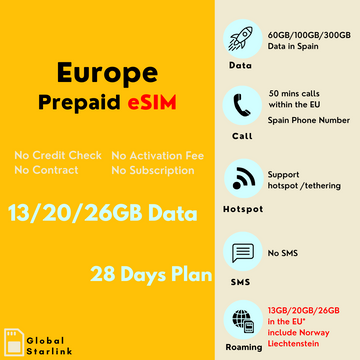
欧洲旅行手机卡
Filter
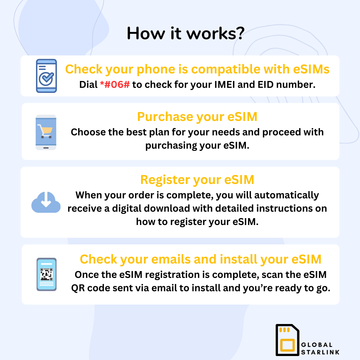
How it works ?
1, Choose Your Plan
Select the plan that suits your travel needs
2, Install Your eSIM
Check your email, Follow the simple steps to install your eSIM
3, Activate & Connect
Turn on Data Roaming! Your eSIM activates automatically upon local network connection
We’re Bringing The Big Brands To eSIM

No Quibble Refunds
Get your money back if you change your mind!
Trusted Local Networks
Enjoy priority speeds with a local eSIM plan—no more roaming delays.
Help In A Hurry
Speak to a real person—online, by phone, or in store!
Connect Instantly
Get connected before you’ve even collected your luggage.
Free Yourself Of Roaming Charges
Grab a pay-as-you-go eSIM plan for just 10% of roaming costs!
Not Just ‘Data Only’
Calls and texts available (in popular destinations).
Recently Viewed Products
Frequently Asked Questions
1. Are you related to Starlink or Starlink Global Logistics?
No, we are not associated with Starlink or Starlink Global Logistics. We are a Melbourne‑based travel SIM and eSIM provider, helping travellers stay connected worldwide since 2016.
2. What is an eSIM, and how does it work?
A Travel eSIM is a digital SIM card that allows you to access mobile networks without needing a physical SIM card. It provides seamless connectivity for data, calls, and texts while traveling.
3. How does it work?
- Confirm Compatibility & Unlock Status
- Ensure your device is unlocked and supports eSIM.
- 📱 Install the eSIM (via QR Code)
- iOS: Go to Settings → Cellular → Add eSIM, then scan the QR code.
- Android: Go to Settings → Connections → SIM Manager (or similar) → Add Mobile Plan, then scan the QR code.
- 📶 Activation Process
- Usually begins once you arrive and connect to a local network, or on your specified arrival date.
- Set it as your primary data plan and enable data roaming.
- Disable auto-switch if your device has that option.
4. Why should I get an eSIM?
Travel eSIMs are the simplest, most flexible, and cost-effective way to stay connected abroad.
✔ No physical SIM required – Keep your primary SIM in place.
✔ Avoid expensive roaming fees – Enjoy local data rates in multiple countries.
✔ Instant activation – No waiting or physical delivery required.
✔ Seamless connectivity – Stay online for navigation, messaging, and bookings.
5. Can I use an eSIM for multiple countries?
Yes! We offer:
• Single-country eSIMs (e.g., Japan eSIM, USA eSIM)
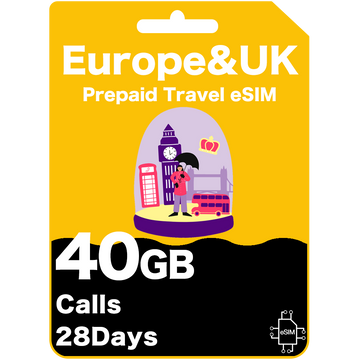
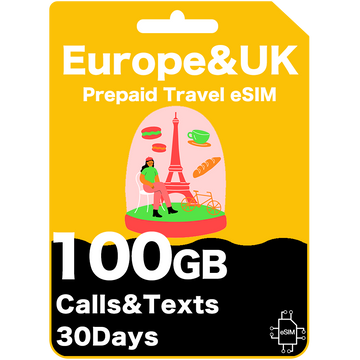
• Regional eSIMs covering multiple destinations (e.g., Europe eSIM, Southeast Asia eSIM).
💡 Tip: Check the product page to ensure your eSIM covers your entire itinerary.
6. When should I buy my eSIM?
You can buy an eSIM anytime and store it in your email until needed.
💡 Note: Some eSIMs expire 90 days or 12 months after purchase, so buy closer to your travel date for maximum validity. Always check the expiry details on the product page.
7. Can I use my eSIM on a cruise?
eSIMs need a mobile network signal to work, so they'll only connect where coverage is available. When you're out at sea, you're too far from network towers, meaning little to no signal. Most cruise ships use satellite networks, which aren't supported by standard eSIM plans. However, once you're closer to port, your eSIM will pick up the signal again and reconnect.
8. I'm not tech savvy, how will I know this will work for me?
It's normal to feel uneasy about new technology, but eSIMs aren't as complicated as they seem! All you need to do is check that your phone supports eSIM and that our plan covers your destination. Once you make your purchase, we'll send you clear setup instructions, and if you need help, our customer support team is always here to assist.
9. Are there any hidden fees?
No, there are no hidden fees! The price you see is the price you pay. Our eSIM and SIM card plans are prepaid, so there are no extra charges, roaming fees, or surprise costs.
If you need more data, you can simply buy another plan—no contracts, no sneaky fees!
10. If I need help, is there someone I can reach out to?
Yes! Our customer support team is available 9 AM – 1 AM AEDT/AEST via live chat or email at hello@globalstarlink.com.au. Please reach out to our team, and we'll be happy to assist you.
1. How do I install and activate my eSIM?
- Confirm Compatibility & Unlock Status
- Ensure your device is unlocked and supports eSIM.
- 📱 Install via QR Code
- iOS: Settings → Cellular → Add eSIM → scan QR.
- Android: Settings → Connections → SIM Manager → Add Mobile Plan → scan QR.
- 📶 Activation
- Begins when you connect to a local network or on your arrival date.
- Set as primary data plan, enable data roaming, disable auto‑switch if available.
2. When should I install and activate my eSIM?
- General Advice: Install before you depart but avoid activating it too soon to prevent starting the plan early.
- Auto Activation: Some eSIMs activate automatically upon detecting the local network or on your chosen date.
- Upon Arrival:
- • Set the eSIM as your primary data plan.
- • Enable Data Roaming.
- • Check or configure your APN if necessary.
- • Restart your device to ensure a proper connection.
- • Make sure airplane mode is turned off.
3. How do I confirm my eSIM is successfully installed before I leave?
- Installation Status: Check under Settings → Mobile Network/Cellular to see if the eSIM profile is present and shows a carrier name.
- Double-Check Upon Arrival:
- Set it as primary data plan.
- Enable data roaming.
- Check or manually set your APN if needed.
- Restart your device to confirm connectivity.
1. Can I use a physical SIM and an eSIM at the same time?
- Dual-SIM Support: Most newer smartphones allow both a physical SIM and an eSIM.
- Recommended Setup: Use the eSIM for data abroad and keep your physical SIM for calls and texts.
- Cost Tip: Receiving calls on your home SIM may incur roaming charges, but receiving SMS is usually free.
2. Can I store multiple eSIMs on my device?
- Multiple Profiles: Many devices let you keep multiple eSIMs, though you can only activate one at a time.
- Easy Switching: Manage this under Settings → Mobile Network/Cellular.
- Long-Term Use: No need to remove old eSIMs; store them for future trips.
3. Where can I use my eSIM?
- Global eSIMs cover 140+ countries.
- Regional eSIMs cover multiple destinations (e.g., Europe, Southeast Asia).
- Single-country eSIMs are tailored for local plans (e.g., Japan, USA).
- Always check the coverage list on the product page to confirm your destination is supported.
4. What network will I be on? How fast is the speed?
- Your eSIM automatically connects to the best local network.
- Expect 4G/5G speeds, typically faster in urban areas.
- Some eSIMs support switching between multiple carriers for the best connection.
5. When does my eSIM plan start?
- It starts once your device connects to a supported network at your destination or on the date you provided.
- Refer to your eSIM details for the exact start conditions.
6. How much data do I need?
- Light User (1–10GB/30 days): Maps, web browsing, messaging.
- Average User (10–20GB/30 days): Adds social media usage.
- Power User (Unlimited/30 days): Ideal for streaming and heavy downloads.
- Pick a plan that fits your travel style for the best experience.
7. How do I check my data balance?
- iOS: Settings → Cellular → Current Period Roaming
- Android: Settings → Connections → Data Usage
8. What if I run out of data? Can I top up?
- No Top-ups: Currently, we don't offer top-ups.
- Buy a New eSIM: You can purchase another plan from our website anytime.
- Spare eSIMs: Keep extra eSIMs handy in your email for quick activation if needed.
9. Can I tether (hotspot) to other devices?
- Yes: Most of our eSIMs support tethering/hotspot.
- Restrictions: Some plans may have limits—check the details on the product page.
10. What if I need an eSIM for a longer trip?
- Recharge Options: Some eSIMs can be recharged or come in longer plans.
- Buy Another eSIM: If no recharge is available, simply purchase a new plan when the current one ends.
11. My eSIM is not working. What should I do?
- Make sure Data Roaming is on.
- Restart your phone.
- Verify the eSIM is set as primary data.
- Check or update APN settings if required.
- If problems continue, contact our support team for help.
1. How do I find the phone number for my eSIM?
- Data-Only eSIMs: Many don't include a phone number—check the product details.
- Welcome Message: If you have a number, some carriers send an SMS with it upon arrival.
- Device Settings: Check Settings → About Phone or SIM Settings.
- Short Codes: Dial codes like *#100# if provided by your carrier.
- Test Call or Text: Call or text another phone to see which number appears.
2. Can I make calls and send texts with my eSIM?
- Data-Only eSIMs: Use apps like WhatsApp, Skype, FaceTime, or iMessage.
- Voice & SMS Included: Some eSIMs do include a phone number; check product details.
3. Can I keep my WhatsApp number while using an eSIM?
- Yes: WhatsApp doesn't change your existing account unless you update it yourself.
4. How can I make calls to local businesses overseas?
- VoIP Apps: WhatsApp, Skype, or Viber work well for calling.
- Contact Methods: Many businesses offer WhatsApp or email.
- Local Calling: Choose an eSIM that includes voice if you need standard calls/SMS.
5. Can I keep my home number for calls and texts while using an eSIM?
- Dual SIM Mode: Yes, you can keep your physical SIM active for calls/texts.
- Roaming Caution: Roaming charges may apply when calling from abroad.
6. How can I call and message friends and family overseas?
- Messaging Apps: WhatsApp, iMessage, Facebook Messenger, and Viber use data or Wi-Fi.
- VoIP Calls: Skype, Google Voice, and FaceTime Audio let you call using data.
- Check Your eSIM: If it includes calls/SMS, standard fees may apply.
7. How can I make international calls and texts to my home country?
- Internet-Based Apps: WhatsApp, Skype, or Viber are cost-effective for international calling.
- eSIM Voice Option: If offered, you can dial directly (check rates or included minutes).
Let customers speak for us
from 3814 reviewsUsed this for a trip to the US and Mexico and it worked perfectly in both. Activation was smooth as, and the customer service team was quick to help when I had a few questions before I flew out.
Popped the eSIM on as soon as I landed at Noi Bai and it connected instantly.
Great coverage across NYC and Chicago. Setup was easy and support was helpful when I had questions. Heaps better than paying for roaming
Not just in the UK I had it working across the Channel Tunnel in France and in Amsterdam too
Even in crowded places like Shibuya, data stayed fast. Streaming and navigation worked smoothly. Really happy with it.
Travelled from Ho Chi Minh City right up to Da Nang and the data didn't skip a beat. Browsing and streaming were smooth the whole way through
Landed in Denpasar and scanned the QR code while waiting for luggage. By the time we walked out, data was already working. Used it around Canggu and Seminyak with no issues at all. Even tested it later in Singapore and it connected straight away. Super convenient and no fuss.
Data speeds were insanely fast in Seoul. Used hotspot for my laptop and it handled it easily.
Activated easily in Canada and worked exactly the same when I crossed into the US
Wait until you land and grab the airport WiFi to install this—it worked like a charm. It kicked in the second I touched down in Honolulu
We drove from Texas up through Colorado and the signal stayed solid almost the entire way. Data speeds were good enough for maps, music and even video calls. Activation was simple and instructions were easy to follow. Didn’t have to think about data once, which is exactly what you want while travelling.
I bought the TrueMove 50GB plan for a 10-day trip to Bangkok and Phuket. Setup was easy as—just scanned the QR code before I left home and it kicked in the second I touched down at Suvarnabhum
Used this across Vietnam, Thailand, Singapore and Japan and it never skipped a beat. Loved not needing to change SIMs between countries. Setup was easy and coverage was strong everywhere, even when crossing borders.
Used this for a month through the States and a few days in Canada. Activation was easy and the coverage didn't drop out once
QR scan, couple of taps and done. Worked straight away when landing. Very smooth experience.